

In a world where almost everything happens online, it is easy to accumulate digital clutter without even realizing it. Old emails, unused apps, forgotten social media accounts, thousands of photos, random downloads, unwanted subscriptions, browser tabs, and accounts you no longer remember creating can quietly take over your digital life. Just as you might declutter your wardrobe, bedroom, or workspace, your digital environment also deserves regular attention. Digital decluttering is the process of reviewing, organizing, deleting, and simplifying the digital information, accounts, files, applications, and online activities that you no longer need. It is not simply about freeing up storage space. It can also help you become more organized, protect your privacy, strengthen your online security, and create a healthier relationship with technology.
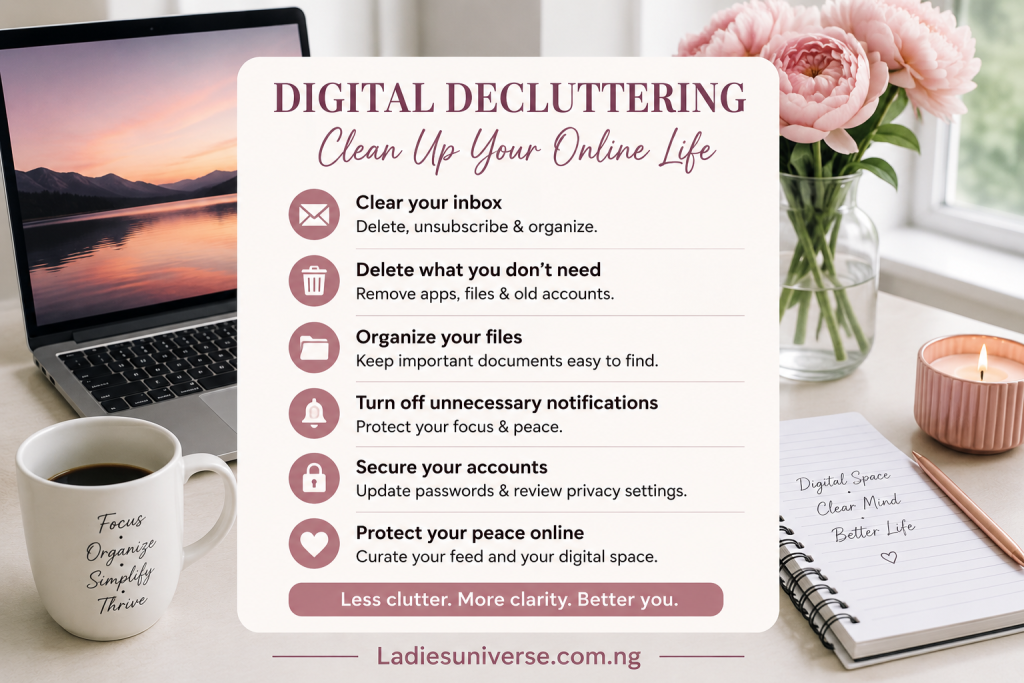
Here is how to clean up your online life without feeling overwhelmed.
What Is Digital Decluttering?
Digital decluttering means intentionally removing digital things that no longer serve a useful purpose. This could include deleting duplicate photographs, unsubscribing from newsletters you never read, removing unused applications, organizing important documents, closing old accounts, clearing unnecessary files, reviewing privacy settings, and reducing the number of notifications competing for your attention. Think of it as creating a cleaner, more intentional digital environment. Your phone, laptop, email inbox, cloud storage, and social media accounts should work for you; not constantly demand your attention.
Why Digital Decluttering Matters
Digital clutter can become more than an organizational problem. An overcrowded inbox can make important messages difficult to find. Hundreds of unnecessary applications can consume storage and create distractions. Old accounts can contain personal information you no longer actively manage. Forgotten subscriptions can continue generating unwanted emails or charges. There is also a privacy and security reason to clean up. The more accounts and services you maintain, the more places your personal information may exist. Regularly reviewing what you still use can help you identify accounts that should be secured, closed, or removed. The U.S. Federal Trade Commission also emphasizes the importance of protecting yourself against identity theft and online security threats.
Start With Your Phone: For many people, the smartphone is the biggest source of digital clutter. Begin by looking through your applications. Ask yourself:
Do I still use this app?
Do I know why I downloaded it?
Does this app need access to my location, camera, microphone, contacts, or photos?
Have I used it within the past few months?
Delete applications you no longer need.
However, don’t automatically delete an app simply because you haven’t opened it recently. Some apps may contain important information, subscriptions, documents, or accounts you may need later. Before removing an application connected to an important service, make sure you understand what happens to your account and data.
Organize Your Photos and Videos: Your camera roll can become a digital storage room filled with screenshots, blurry pictures, duplicates, receipts, memes, old videos, and photographs you no longer need. Instead of trying to organize everything in one day, divide the process into manageable sections. Start with:
Screenshots → Duplicate photos → Videos → Downloads → Important memories
Delete duplicates and accidental photographs first. Then create albums for photographs you genuinely want to keep. You don’t need to delete every old photograph. The goal is to make meaningful memories easier to find.
Take Control of Your Email Inbox: An overflowing inbox can make digital life feel unnecessarily stressful. Start by unsubscribing from newsletters, promotional emails, and mailing lists you no longer want. Then search for old messages you don’t need and delete them. For important emails, create folders or labels such as:
Work
Finance
Education
Personal
Travel
Receipts
Important documents
You don’t have to achieve “Inbox Zero.” A functional inbox is more useful than an empty one. The goal is to make important information easy to find.
Review Your Social Media Accounts: Social media is another area that deserves a serious digital cleanup. Look through the platforms you use and ask yourself whether each account still reflects who you are and what you want your online presence to communicate. Consider:
Removing old posts that no longer represent you
Archiving photographs
Unfollowing accounts that negatively affect your experience
Leaving inactive groups
Removing connections you no longer recognize
Reviewing your privacy settings
Turning off unnecessary notifications
Your digital presence contributes to your online identity, so it is worth managing intentionally.
Delete Old Accounts: Think about all the websites and services you have signed up for over the years. Some may be accounts you haven’t touched in years. If you are certain you no longer need an account, consider closing it rather than allowing it to remain forgotten. Before deleting an account, however, check whether it contains important photographs, documents, purchases, subscriptions, or information you may need. For example, deleting a Google Account can result in losing access to associated Gmail, Drive, Photos, Calendar, YouTube, and other data. Google recommends reviewing and downloading information you want to keep before deleting an account.
Review Your Passwords and Security: Digital decluttering should not only make your online life look cleaner; it should make it safer. Review the passwords associated with your important accounts and make sure you are not relying on weak or reused passwords. Where available, enable multi-factor authentication. This adds another layer of protection beyond your password. Pay particular attention to:
Email accounts
Banking and financial accounts
Social media
Cloud storage
Shopping accounts
Work-related accounts
Your primary email account deserves special attention because it is often connected to password resets for many other services.
Clean Up Your Cloud Storage: Cloud storage can quietly become a digital attic. Old documents, duplicate files, forgotten videos, large attachments, and outdated backups can consume significant space. Go through services such as your cloud drive and organize files into clearly named folders. Delete what you no longer need and download important documents if you want an additional personal backup. Don’t forget to check your storage regularly rather than waiting until you receive a “storage full” notification.
Review Your Digital Footprint: Your digital footprint is the information and activity associated with your presence online. Search your name occasionally and see what publicly available information appears. You may discover old profiles, forgotten accounts, outdated photographs, or information you no longer want publicly visible. Where possible, update or remove information that is outdated or unnecessary. Also review the privacy settings on your major accounts. Google, for example, provides tools that allow users to review and delete activity saved in their accounts, including options for automatic deletion. Remember, however, that deleting information from your personal account does not necessarily mean that every copy of information elsewhere on the internet disappears.
Turn Down the Notifications: Not every app deserves your immediate attention.Constant notifications can make it difficult to concentrate and can encourage you to check your phone repeatedly. Go through your notification settings and disable alerts that aren’t genuinely useful. You may want to keep notifications for important messages, calls, banking alerts, work, security, or other essential services while reducing unnecessary promotional and social notifications. Your phone should not dictate your attention every few minutes.
Create a Digital Decluttering Routine: You don’t have to spend an entire weekend cleaning your digital life. A simple monthly routine can make a huge difference. For example:
Week 1: Clean your phone and delete unused apps.
Week 2: Organize your photographs and files.
Week 3: Clean your email inbox and unsubscribe from unwanted newsletters.
Week 4: Review passwords, privacy settings, social media, and old accounts.
You can also set aside 15–20 minutes every month for a quick digital check-up. Small, consistent actions are much easier to maintain than waiting until digital clutter becomes overwhelming.
A Simple Digital Decluttering Checklist
Before you finish, ask yourself:
☐Have I deleted unused apps?
☐ Have I removed unnecessary photographs and screenshots?
☐ Have I organized important files?
☐ Have I unsubscribed from unwanted emails?
☐ Have I reviewed my social media accounts?
☐ Have I closed unnecessary old accounts?
☐ Have I reviewed important passwords?
☐ Have I enabled additional security where available?
☐ Have I checked my privacy settings?
☐ Have I reduced unnecessary notifications?
☐ Have I reviewed my cloud storage?
☐ Have I checked what information about me is publicly available online?
Digital decluttering is not about becoming obsessed with having a perfectly organized phone or an empty inbox. It is about becoming more intentional about the digital life you have created. Every account you create, photograph you save, newsletter you subscribe to, application you download, and website you give your information to becomes part of your digital environment. You don’t have to keep everything simply because you once needed it. Give yourself permission to delete what is unnecessary, organize what matters, protect what is private, and step away from what constantly demands your attention. A cleaner digital life can make it easier to find what matters, protect your information, and use technology with greater intention. And sometimes, the best digital decluttering decision isn’t downloading another productivity app. It’s simply deciding that you don’t need one more thing competing for your attention. LadiesUniverse; Helping women grow, glow, and know their worth.